

Dropbox: Secure Cloud Storage
應用程式內購

4.4star
233萬則評論

適合所有人
info
10億+
次下載
編輯精選




關於這個應用程式
Dropbox allows you to backup your most essential files to the cloud, where you may access them at any time and from any location! Over 700 million registered users and 600,000 teams rely on it. Simple to use, trustworthy, private, and secure!
Features:
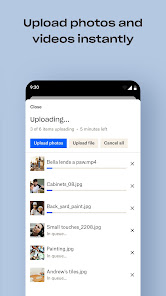
• Automatically upload photos and pictures from your camera roll to cloud photo storage for easy photo sharing ready to send anywhere.
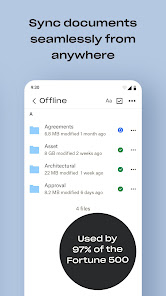
• Access any file in your account—even offline—and preview over 175 different file types with no special software required.
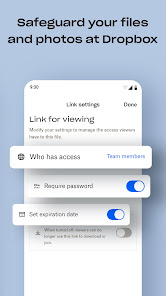
• Easily send large files by sharing a link with anyone, even if they don’t have a Dropbox account.
• Photo transfer app: easily save photos to the cloud or transfer photos from your cloud storage app.
• Scan documents, receipts, IDs, photos, and more using your mobile device and transform them into high-quality PDFs, so you can view and send them anywhere.
• Sync folders on your PC or Mac to Dropbox with computer backup, and recover older versions or restore deleted files with version history and file recovery.
Cloud storage & drive photo storage gives you extra space to backup, upload, share, and scan & we transfer photos or files to the cloud for you! An easy backup and data vault with safe access to your private or shared files. Today you can easily manage and share family albums, video albums, and more.
Sign up now for your free Dropbox Plus trial. Get 2 TB (2,000 GB) of storage space!
New features on the Plus plan:
Dropbox Passwords: store and sync passwords across all your devices
Dropbox Vault: secure your most sensitive documents and photos
Dropbox Rewind: roll back any file, folder, or your entire account, for up to 30 days
Before completing payment, you’ll see the plan price. This amount will be charged to your Google Play account and will vary by plan and country. Dropbox subscriptions purchased in-app renew monthly or yearly, depending on your plan. To avoid auto-renewal, turn it off at least 24 hours before your subscription renews. You can turn off auto-renewal anytime from your Google Play account settings.
Dropbox is a secure cloud & drive solution leader trusted by Fortune 500 companies for their most sensitive data. Over 14 million paid users choose Dropbox because they know they can count on a company that’s also dedicated to their security and privacy—no matter what they do or where they are. Let Dropbox be your all-in-one file storage, file organizer, file transfer, and file sharing solution for all your devices.
We’d love to hear from you! Join the Dropbox community: https://www.dropboxforum.com
Terms of Service: https://www.dropbox.com/terms
Privacy Policy: https://www.dropbox.com/privacy
Features:
• Automatically upload photos and pictures from your camera roll to cloud photo storage for easy photo sharing ready to send anywhere.
• Access any file in your account—even offline—and preview over 175 different file types with no special software required.
• Easily send large files by sharing a link with anyone, even if they don’t have a Dropbox account.
• Photo transfer app: easily save photos to the cloud or transfer photos from your cloud storage app.
• Scan documents, receipts, IDs, photos, and more using your mobile device and transform them into high-quality PDFs, so you can view and send them anywhere.
• Sync folders on your PC or Mac to Dropbox with computer backup, and recover older versions or restore deleted files with version history and file recovery.
Cloud storage & drive photo storage gives you extra space to backup, upload, share, and scan & we transfer photos or files to the cloud for you! An easy backup and data vault with safe access to your private or shared files. Today you can easily manage and share family albums, video albums, and more.
Sign up now for your free Dropbox Plus trial. Get 2 TB (2,000 GB) of storage space!
New features on the Plus plan:
Dropbox Passwords: store and sync passwords across all your devices
Dropbox Vault: secure your most sensitive documents and photos
Dropbox Rewind: roll back any file, folder, or your entire account, for up to 30 days
Before completing payment, you’ll see the plan price. This amount will be charged to your Google Play account and will vary by plan and country. Dropbox subscriptions purchased in-app renew monthly or yearly, depending on your plan. To avoid auto-renewal, turn it off at least 24 hours before your subscription renews. You can turn off auto-renewal anytime from your Google Play account settings.
Dropbox is a secure cloud & drive solution leader trusted by Fortune 500 companies for their most sensitive data. Over 14 million paid users choose Dropbox because they know they can count on a company that’s also dedicated to their security and privacy—no matter what they do or where they are. Let Dropbox be your all-in-one file storage, file organizer, file transfer, and file sharing solution for all your devices.
We’d love to hear from you! Join the Dropbox community: https://www.dropboxforum.com
Terms of Service: https://www.dropbox.com/terms
Privacy Policy: https://www.dropbox.com/privacy
更新日期
精選報導


評分和評論
4.4
217萬則評論

戴小芳
- 檢舉不當評論
2026年4月7日
線上客服回覆只以英文回覆,非常不方便。請他們協助查詢並取消誤按的年度使用申請,一直沒處理好,所以又被收了125美元,只能再找英文好的朋友找時間才能幫我在線上跟他們溝通,很不方便。

chia-yi
- 檢舉不當評論
2026年4月16日
能不能一次性買斷個比如說5g或者10g的容量,其實我用這個多差不多了...進階方案都太多了也太貴了
3 位使用者認為這則評論有幫助

劉秉華
- 檢舉不當評論
2026年3月28日
不知道何時自己變成自動備份,自己上傳了一堆檔案,然後免費空間又小,不知道這麼反人類的設計硬要使用者付費真的是有夠爛
新功能
新功能
• 現在您只要在預覽畫面按一下,就能輕鬆共享相片和檔案,或是為相片和檔案標示星號。
我們經常推出更新版,希望能將 Dropbox 應用程式做得更好。若您有任何想法或是使用時遇到問題,請前往我們的討論區。我們很樂意協助您!
• 現在您只要在預覽畫面按一下,就能輕鬆共享相片和檔案,或是為相片和檔案標示星號。
我們經常推出更新版,希望能將 Dropbox 應用程式做得更好。若您有任何想法或是使用時遇到問題,請前往我們的討論區。我們很樂意協助您!
應用程式支援
開發人員資訊
Dropbox, Inc.
support@dropbox.com
1800 Owens St Ste 200
San Francisco, CA 94158
United States
+1 888-596-1255


