

Dropbox: Secure Cloud Storage
In-app purchases

4.4star
2.33M reviews

Everyone
info
1B+
Downloads
Editors' Choice




About this app
Dropbox allows you to backup your most essential files to the cloud, where you may access them at any time and from any location! Over 700 million registered users and 600,000 teams rely on it. Simple to use, trustworthy, private, and secure!
Features:
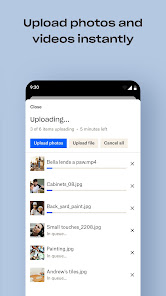
• Automatically upload photos and pictures from your camera roll to cloud photo storage for easy photo sharing ready to send anywhere.
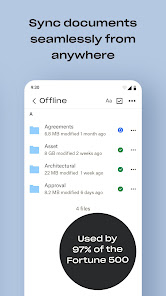
• Access any file in your account—even offline—and preview over 175 different file types with no special software required.
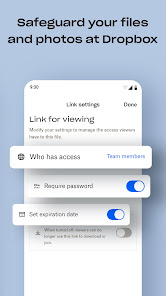
• Easily send large files by sharing a link with anyone, even if they don’t have a Dropbox account.
• Photo transfer app: easily save photos to the cloud or transfer photos from your cloud storage app.
• Scan documents, receipts, IDs, photos, and more using your mobile device and transform them into high-quality PDFs, so you can view and send them anywhere.
• Sync folders on your PC or Mac to Dropbox with computer backup, and recover older versions or restore deleted files with version history and file recovery.
Cloud storage & drive photo storage gives you extra space to backup, upload, share, and scan & we transfer photos or files to the cloud for you! An easy backup and data vault with safe access to your private or shared files. Today you can easily manage and share family albums, video albums, and more.
Sign up now for your free Dropbox Plus trial. Get 2 TB (2,000 GB) of storage space!
New features on the Plus plan:
Dropbox Passwords: store and sync passwords across all your devices
Dropbox Vault: secure your most sensitive documents and photos
Dropbox Rewind: roll back any file, folder, or your entire account, for up to 30 days
Before completing payment, you’ll see the plan price. This amount will be charged to your Google Play account and will vary by plan and country. Dropbox subscriptions purchased in-app renew monthly or yearly, depending on your plan. To avoid auto-renewal, turn it off at least 24 hours before your subscription renews. You can turn off auto-renewal anytime from your Google Play account settings.
Dropbox is a secure cloud & drive solution leader trusted by Fortune 500 companies for their most sensitive data. Over 14 million paid users choose Dropbox because they know they can count on a company that’s also dedicated to their security and privacy—no matter what they do or where they are. Let Dropbox be your all-in-one file storage, file organizer, file transfer, and file sharing solution for all your devices.
We’d love to hear from you! Join the Dropbox community: https://www.dropboxforum.com
Terms of Service: https://www.dropbox.com/terms
Privacy Policy: https://www.dropbox.com/privacy
Features:
• Automatically upload photos and pictures from your camera roll to cloud photo storage for easy photo sharing ready to send anywhere.
• Access any file in your account—even offline—and preview over 175 different file types with no special software required.
• Easily send large files by sharing a link with anyone, even if they don’t have a Dropbox account.
• Photo transfer app: easily save photos to the cloud or transfer photos from your cloud storage app.
• Scan documents, receipts, IDs, photos, and more using your mobile device and transform them into high-quality PDFs, so you can view and send them anywhere.
• Sync folders on your PC or Mac to Dropbox with computer backup, and recover older versions or restore deleted files with version history and file recovery.
Cloud storage & drive photo storage gives you extra space to backup, upload, share, and scan & we transfer photos or files to the cloud for you! An easy backup and data vault with safe access to your private or shared files. Today you can easily manage and share family albums, video albums, and more.
Sign up now for your free Dropbox Plus trial. Get 2 TB (2,000 GB) of storage space!
New features on the Plus plan:
Dropbox Passwords: store and sync passwords across all your devices
Dropbox Vault: secure your most sensitive documents and photos
Dropbox Rewind: roll back any file, folder, or your entire account, for up to 30 days
Before completing payment, you’ll see the plan price. This amount will be charged to your Google Play account and will vary by plan and country. Dropbox subscriptions purchased in-app renew monthly or yearly, depending on your plan. To avoid auto-renewal, turn it off at least 24 hours before your subscription renews. You can turn off auto-renewal anytime from your Google Play account settings.
Dropbox is a secure cloud & drive solution leader trusted by Fortune 500 companies for their most sensitive data. Over 14 million paid users choose Dropbox because they know they can count on a company that’s also dedicated to their security and privacy—no matter what they do or where they are. Let Dropbox be your all-in-one file storage, file organizer, file transfer, and file sharing solution for all your devices.
We’d love to hear from you! Join the Dropbox community: https://www.dropboxforum.com
Terms of Service: https://www.dropbox.com/terms
Privacy Policy: https://www.dropbox.com/privacy
Updated on
Featured stories

Safety starts with understanding how developers collect and share your data. Data privacy and security practices may vary based on your use, region, and age. The developer provided this information and may update it over time.


Ratings and reviews
4.4
2.17M reviews

Mantille Snow
- Flag inappropriate
June 13, 2026
It's not customizable. The font all blends in together. I can't make one side larger and the other one Smaller by just moving the center line. I was able to do that in the previous app, which I was forced to switch from. It's definitely a lag time, and I've had a glitch almost every other day since I started using it three weeks ago.

tru olson
- Flag inappropriate
- Show review history
June 12, 2026
i can't find any way to find out how much the subscription costs after the free trial. it's not in my Google accounts subscription manager nor in the Dropbox subscription manager. i can't assess whether i want to continue unless i know how much it'll cost. eta: that answer doesn't actually solve the problem, but don't worry i figured out how to cancel without your help.
Dropbox, Inc.
June 3, 2026
Hi there! Go ahead and have a look at this page: https://www.dropbox.com/plans, to view the plans and their pricing. For assistance, please post on our community https://community.dropbox.com/, or contact our team on X at @DropboxSupport or Facebook at facebook.com/Dropbox. Thanks!

donald smith
- Flag inappropriate
April 30, 2026
Sign-in issue: I was reviewing a video file I have, and it kept saying "offline" after playing for 1 minute. I updated, uninstalled, and tried signing in; however, after going through the steps, I was constantly met with an error message. I tried selecting the "trouble signing in" option to select an email link; however, when I do that, it says "not online" when I am online.
11 people found this review helpful
Dropbox, Inc.
May 5, 2026
Hi there, we’re sorry to hear about that. If you'd like, please post on our community https://www.dropboxforum.com/, or contact our team on X at @DropboxSupport or Facebook at facebook.com/Dropbox. We'd like to gather more information, and look into this with you. Thanks!
What’s new
What’s new?
• You can now easily share and star your photos and files with one click in the preview screen.
We release updates regularly and are always looking for ways to make the app better. If you have any feedback or run into issues, come find us in our forums. We’re happy to help!
• You can now easily share and star your photos and files with one click in the preview screen.
We release updates regularly and are always looking for ways to make the app better. If you have any feedback or run into issues, come find us in our forums. We’re happy to help!
App support
About the developer
Dropbox, Inc.
support@dropbox.com
1800 Owens St Ste 200
San Francisco, CA 94158
United States
+1 888-596-1255


